

Introduction: Why Florida Demands a Specialist Approach to Amazon Seller Accounting
This is one of the most active states for Amazon FBA sellers in the country – but also one that gets massively underestimated when it comes to compliance. You can’t just get by with a spreadsheet and a once-a-year tax filing to get Amazon seller accounting right here. There are so many things to keep track of – the 2021 marketplace facilitator law, the fact that the 67 different counties charge their own discretionary surtax rates, then there’s the $100,000 economic nexus threshold, plus the physical nexus risk that comes with having FBA warehouses all over the state. As a result, sellers are facing a real compliance headache that even some seasoned sellers don’t see coming.
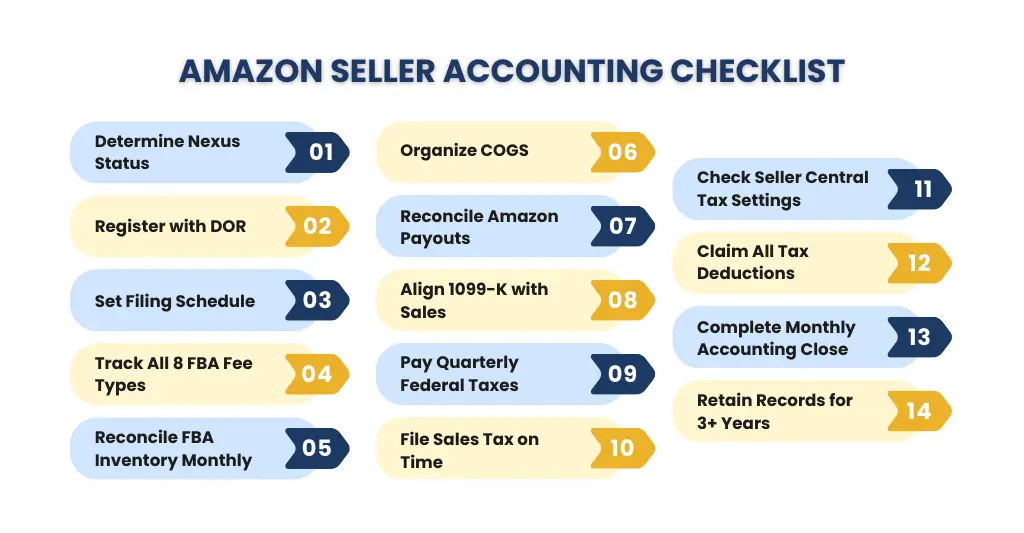
Working with ecommerce accountants who really get the ins and outs of the local tax system and how FBA fees fit into that, not to mention Amazon payout reconciliation, is what makes all the difference between having a profitable compliant business and one that’s quietly racking up tax problems on the side. This checklist is designed to walk you through every aspect of Amazon seller accounting – 14 points in total that cover fees, inventory, sales tax, quarterly filing, and how to do your monthly accounting properly.
Who This Checklist Is For:
This checklist is for Amazon FBA sellers shipping to customers in this state who:
- Are approaching the $100K annual sales threshold
- Have FBA inventory stored in local fulfillment centers
- Sell on both Amazon and Shopify
- Or are just looking for a clear, repeatable accounting process for their sales
Section 1: Sales Tax Nexus – Don’t File Till You Know This
Checklist Item #1: Figure Out Your Nexus Status
Before you start making your sales tax filing, you first need to figure out whether you actually have a nexus here. Two main types of nexus can cause you a whole lot of trouble.
Economic Nexus – $100K And You’re Good To Go (Or Not)
Things changed for ecommerce sellers on July 1, 2021. Now, any online sellers that made over $100,000 in taxable in-state sales during the previous year have to register, collect and pay sales tax. And unlike most states, the lookback period covers the previous calendar year – so even if you slow down in 2025, you’ll still owe for that year if you exceed $100K in 2024.
Physical Nexus – Instant Trigger
If you’ve got FBA inventory stored in an Amazon fulfillment center within the state, then you’ve got a physical nexus – and it doesn’t matter how much you make. Having any physical property in the state automatically triggers a sales tax obligation – and Amazon’s inventory system can move your stock around without you even knowing about it. Many sellers are shocked to find out their stock has been moved here.
Time to Act: Double Check Your Inventory Report
Log in to Seller Central, go to Reports, then Fulfillment, then Inventory Event Detail. If the state is listed, it means your products are being stored there – which means you’ve got a physical nexus and need to register and start collecting sales tax right away. Our team can help you review your historic nexus situation.
Once you’ve established nexus, you need to get registered with the Department of Revenue before you can even start collecting sales tax. Registration is free, and the DOR will then determine your filing frequency based on how much you expect to owe each month.
Section 2: Registering With the DOR & Your Filing Deadlines
Checklist Item #2: Register With the DOR Before Collecting Any Tax
Registration is a straightforward process – just head over to the Department of Revenue website and fill out the online application. It usually takes a couple of weeks to get approved – don’t forget to sort out your ecommerce platform and sales tax automation tools before your first tax payment is due. And registration is free – yay.
Checklist Item #3: Get Your Filing Schedule Down
The DOR will assign you a filing frequency based on how much they think you’ll owe each month. Your deadlines are as follows: if you’re filing monthly, you’re due on the 20th of the month after; if you’re quarterly, you’re due on April 20, July 20, October 20 and January 20; and if you’re an annual filer, you’re due by January 20 for the year before. Miss a deadline and you’ll start racking up penalties straight away.
One last thing to keep in mind: there’s a 2.5% timely filing discount up to $1,200 (that’s a max of $30 per filing period) if you file on time and keep it up. It’s not a lot, but it’s better than nothing.
67 Counties and Surtax Rates
The base sales tax rate is 6%, but every county adds its own surtax – ranging from 0.5% to 2% – making combined rates jump between 6% and 8% depending on which county the customer is from. This is a destination-based state, which means you need to apply the customer’s county rate to every transaction. With 67 counties to deal with, manually keeping track of rates is just a recipe for mistakes. Our Amazon Accountants handle all that hassle for FBA clients with no need for you to lift a finger.
Section 3: FBA Fee Tracking – A Graveyard for Many an Amazon Seller’s Accounting
Checklist Item #4: Don’t Mess This Up – Separate Out All 8 of Amazon’s FBA Fee Types
We see it all the time – sellers bundling all their Amazon charges into one big “Amazon fees” ledger account – it’s a rookie mistake that can cost you big time when it comes to Amazon seller accounting. Every fee type has to be recorded as a separate line item in your general ledger – not only for accurate profit & loss reporting, but to make sure you’re getting all the tax credits you deserve at tax time.
| FBA Fee Type | What It Covers | Accounting Treatment |
|---|---|---|
| Referral Fee | % of sale price per product category | Operating expense, not a cost of goods sold |
| FBA Fulfillment Fee | Pick, pack & ship per unit by size tier | Either a cost of goods sold or an operating expense |
| Monthly Storage Fee | Cubic feet/month (Jan–Sep: $0.78; Q4: $2.40) | Operating expense – don’t let it sneak up on you |
| Aged Inventory Surcharge | Inventory unsold 181+ days in FC | Operating expense, but a big one |
| Inbound Placement Fee | Distributing inventory to FCs (2025+) | Operating expense |
| Return Processing Fee | High-return-rate product categories | Operating expense |
| Professional Selling Plan | Your monthly $39.99 subscription | Fixed overhead |
| Advertising (PPC) | Sponsored Products / Brands / Display | Marketing expense – track it separately |
The Q4 Storage Fee Nightmare
Monthly FBA storage fees shoot up from $0.78 per cubic foot (January to September) to $2.40 per cubic foot during the peak Q4 season. If you’re a seller bringing in seasonal inventory, you need to model this cost spike into your cash flow projections and factor it into your pricing strategy before you even start ordering for Q4.
Section 4: Inventory Reconciliation – A Crucial Part of Keeping Your Books Balanced
Checklist Item #5: No Excuses – Reconcile Your FBA Inventory Every Month Without Fail
Reconciling your FBA inventory every month is crucial – you need to account for units received vs. shipped, units sold, units returned, units Amazon has lost or damaged – and any reimbursements owed to you for that damaged inventory – and watch out for that 181-day surcharge for old stock piling up.
Checklist Item #6: Get Your COGS in Order
Getting your Bookkeeping For Ecommerce right starts with COGS – and that means tracking all these costs at the individual SKU level:
- The cost of each item from the supplier or manufacturer
- The freight cost to get the stock to Amazon’s warehouses
- Customs duties and import fees if you’re sourcing from abroad
- Amazon’s prepping, labeling, and inbound placement fees
- All the storage costs for slow-moving inventory
Incorrect COGS figures distort your taxable income — overstating it by not capturing all costs, or understating it by misallocating non-COGS expenses. Our inventory accounting framework captures every cost layer and produces a true contribution margin per SKU — the number that tells you what is actually driving profit in your catalog.
Section 5: The Importance of Amazon Payout Reconciliation
Checklist Item #7: Do You Know What Your Amazon Payout Really Means? Reconcile Every Payout
The most common mistake in Amazon seller accounting is recording the bi-weekly Amazon deposit solely as gross revenue. Unfortunately, that bank deposit is a combined figure – it includes your sales minus all those nasty FBA fees, referral fees, ad spend, storage costs, refunds and any reserves that Amazon is holding onto. If you simply record it as your top-line revenue, you’re seriously overestimating income and ending up with a completely inaccurate Profit and Loss.
Every single Amazon payout must be broken down into its actual components:
- Gross sales – the total revenue from all orders in the period
- FBA fees (they vary per unit & size)
- Referral fees – the percentage varies by category
- Ad spend (PPC costs for the past period)
- Storage and aged inventory surcharges (monthly and overdue)
- Customer refunds and return processing fees
- Any reimbursements owed for lost or damaged inventory
- Net disbursement – the amount that actually ends up in your bank
Our ecommerce bookkeeping do this entire reconciliation for every bi-weekly payout automatically using smart integrations with Seller Central – it means your P&L will reflect actual gross revenue, not some net payout figure.
Checklist Item #8: Get Your 1099-K on the Same Page as Your Seller Central Sales
Amazon hands out a Form 1099-K that shows your gross sales to the IRS. Your 1099-K total is going to be much higher than the net payout amount – because it shows your sales before all those fees and refunds. If you report the 1099-K figure as income without netting off those deductibles, you’ll end up seriously overestimating your taxable income. To make matters even more complicated, you’ll need to reconcile the Combined Sales Tax Report and Marketplace Tax Collection Report from Seller Central separately.
Section 6: Amazon Sellers – Keep on Top of Quarterly Tax Filing
Checklist Item #9: Get Your Federal Quarterly Estimated Taxes Paid Up
For anyone running their own business as an Amazon seller taxes, managing taxes at the federal level means making quarterly estimated tax payments to stay on time. The 2025 IRS quarterly deadlines for self-employed sellers are: April 15 for Q1, June 16 for Q2, September 15 for Q3 and January 15, 2026 for Q4. Don’t forget, if you underpay your quarterly estimates, you’ll get hit with an underpayment penalty – a whopping 3% extra on top of the federal short-term rate.
To make sure you never end up facing that penalty, use your prior year’s tax liability as a safe baseline – if you pay 100% of last year’s tax (110% if you exceeded $150,000) that protects you from underpayment even if your income goes up this year.
Checklist Item #10: Keep Those State Sales Tax Returns on Schedule
File them through the Department of Revenue’s MyFloridaTax portal, and don’t forget to submit any that need to be filed electronically – that includes any businesses which paid over $5,000 in state sales tax in the past year. In months with no sales, make sure to still file a zero-dollar return to keep things right. Our Amazon Accountants handle the whole calendar for our clients – monthly, quarterly and annual returns, all filed on time with zero exceptions.
Checklist Item #11: Keep an Eye on Your Seller Central Tax Settings Every Quarter
Make sure your state is set up correctly in your Seller Central tax settings. Check that your product tax codes are accurate for your category, your collection is turned on in all nexus states, and county surtax rates are up to date – they’re updated every year on January 1. If you’ve got your tax settings wrong you’re either over-collecting from customers or under-collecting and picking up the tab for the shortfall.
Section 7: Tax Deductions Checklist – Every Penny Counts for an FBA Seller
Checklist Item #12: Make Sure You’re Taking Every Tax Deduction Available to You
Sorting out your Amazon seller taxes so you’re taking advantage of every ecommerce tax deduction possible is one of the smartest money-saving moves an FBA seller can make. It’s amazing how many sellers are just leaving cash on the table because they’re missing deductions that are clearly allowed under IRS rules.
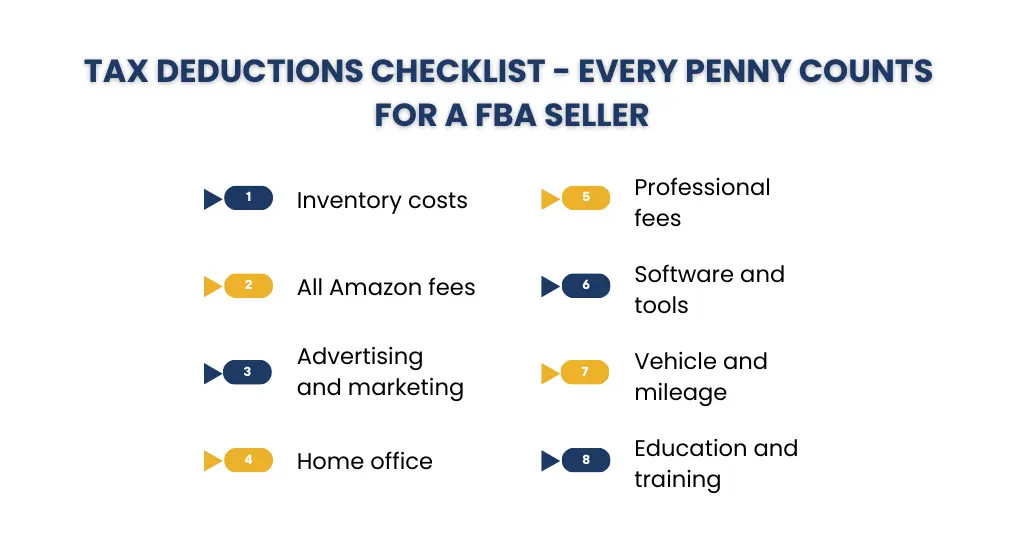
Core Expenses That Are Deductible for FBA Sellers:
- Inventory costs: cost of goods sold, supplier invoices, manufacturing costs, inbound freight, import duties
- All Amazon fees: fulfillment fees, referral fees, storage fees, subscription plan, and advertising spend
- Advertising and marketing: Amazon PPC, social media ads, influencer marketing, product photography
- Home office: pro-rata rent or mortgage interest, utilities, internet, office expenses
- Professional fees: accountants, consultants, Amazon specialists, legal fees
- Software and tools: accounting software, inventory management tools, repricing tools, tax automation
- Vehicle and mileage: trips to sourcing locations, trade shows, visiting suppliers
- Education and training: ecommerce courses, Amazon seller masterminds, industry conferences
Note: From October 1, 2025, the state basically drops its sales tax on commercial real estate leases – if you lease a warehouse or office space locally, this will wipe out a cost that previously applied. Get your legal team to review your commercial lease agreements in light of this change.
Section 8: Monthly Accounting Close Checklist for Amazon Sellers
Checklist Item #13: Get Your Monthly Accounting Close Sorted
Doing a clean and consistent monthly close is the foundation of really good Amazon seller accounting. It means your DOR filings, quarterly federal tax payments, and financial statements are all based on solid, reconciled data – not guesses or last-minute fixes.
Here are the five steps every FBA seller should be following:
- Step 1 — Bank reconciliation: get all your Amazon disbursements, Shopify payouts, and business deposits matched to your general ledger
- Step 2 — FBA inventory reconciliation: check your accounting records match the units you received, sold, returned, and reimbursed for the month
- Step 3 — Post any adjusting journal entries: rack up any unpaid vendor invoices, tick off prepaid expenses, get any pending FBA reimbursements into the books
- Step 4 — Produce your financial statements: P&L, balance sheet, and cash flow statement – including a SKU-level profitability report and a nexus threshold update
- Step 5 — Check your DOR filing calendar: confirm every return is scheduled, flag any zero-dollar returns, and make sure quarterly federal estimate payments are locked in your calendar
Checklist Item #14: Keep Records for 3 Years or More – You Can’t Be Too Careful
The IRS recommends holding onto all tax-related records for at least 3 years from the day you filed. As a seller in this state, you should be holding onto: Seller Central sales tax reports, 1099-K forms, DOR filed returns, COGS documentation, FBA fee reports, inventory event reports, bank statements and all professional service invoices too.
A Roadmap to Compliance
Meet Sarah, an Amazon FBA seller. After hitting the $100,000 threshold, Sarah found herself prompted to register for sales tax collection. She was able to navigate her nexus registration and quarterly filings with ease, thanks to following this checklist – which is why her business stayed compliant and profitable.
But Sarah’s not the only one…
Costly Mistakes to Avoid – The Case of John’s Overlook
John ignored the implications of physical nexus when Amazon moved his inventory to a local warehouse. Imagine his surprise when he was hit with fines and back taxes due to missed filings and not being registered. All this could’ve been easily avoided with regular monitoring and a proactive approach to Amazon seller accounting.
Takeaway: We’ve got a team of expert Amazon accountants and Ecommerce specialists here to help you navigate the world of tax laws and ensure you stay on the right side of compliance.
Section 9: Common Amazon Seller Accounting Mistakes We See Sellers Making
Even the most experienced sellers still manage to trip up on these Amazon seller accounting errors – catch them early and you can avoid penalties, back-tax assessments and distorted financial reports:
- Recording that bi-weekly Amazon deposit as gross revenue, without accounting for fees, refunds, and reserves — your P&L will be as useful as a chocolate teapot
- Assuming Amazon’s marketplace facilitator status means you’re off the hook — you still need to register, file and deal with zero-dollar returns once nexus is established
- Not knowing Amazon moves inventory between centers without telling you — that creates unrecognised physical nexus and can get you into all sorts of trouble
- Applying your own tax rate instead of the customer’s county rate — one of the most common destination-state errors out there
- Missing quarterly estimated federal tax payments — even if you pay the balance in full at filing, the IRS will still hit you with an underpayment penalty
- Bundling all FBA fees into one big ledger account
- Overlooking legitimate ecommerce tax deductions and losing out on serious cash
- Using a general accountant with no Amazon FBA experience — they’ll likely mess up your 1099-K reconciliation, FBA fee structures, and marketplace facilitator filings
Every single one of these mistakes can be fixed, but the longer you leave them, the more they’ll get out of hand. Our specialist Ecommerce Accountants will find and resolve these issues before they turn into a full-blown state audit or multi-year back-tax nightmare.
Section 10: Amazon FBA Accounting Support Across Key Seller States
We provide specialist Amazon seller accounting services across the four major FBA seller states. Each state has its own nexus rules, filing schedules, local tax structures, and income tax obligations — and our teams are built around that state-specific expertise.
| State | Our Ecommerce Accounting Services |
| Ecommerce Accounting in Florida | Amazon seller accounting, $100K nexus compliance, state DOR filings, county surtax tracking, and FBA payout reconciliation |
| Ecommerce Accounting in Texas | FBA nexus compliance, franchise tax planning, and multi-warehouse COGS tracking |
| Ecommerce Accounting in New York | Dual-threshold nexus, NY income and franchise tax filings, and multi-channel bookkeeping |
| Ecommerce Accounting in California | CDTFA $500K nexus, multi-county tax rates, and FBA bookkeeping |
Managing obligations across multiple states? Our national team handles every filing, every threshold, and every deadline — so nothing slips through the cracks.
Pick Up the Phone: Book a Free Consultation with Our Amazon Seller Accounting Team
Our specialist Amazon Accountants and Ecommerce Accountants serve Florida, Texas, New York, and California – and we’re here to help. Get a free compliance and accounting review today.
FAQs: Frequently Ask Question
Do I need to register for sales tax if Amazon is already collecting it as a marketplace facilitator?
Yes — even though Amazon collects and remits sales tax on your behalf for Amazon-channel sales, you may still need to register with the Department of Revenue once you’ve established nexus. Registration, filing zero-dollar returns, and managing any non-Amazon channel sales like Shopify remain entirely your responsibility.
How do I know if Amazon has moved my FBA inventory into a local fulfillment center?
Log into Seller Central, go to Reports → Fulfillment → Inventory Event Detail. If the state appears in that report, your stock is being stored there and you’ve automatically triggered physical nexus — regardless of your sales volume or transaction count.
What’s the difference between the $100,000 economic nexus threshold and physical nexus?
Economic nexus kicks in when your taxable sales exceed $100,000 in the previous calendar year. Physical nexus, on the other hand, triggers the moment Amazon stores your inventory in a local warehouse — with no sales threshold whatsoever. Either one creates a full sales tax obligation.
What happens if I’ve been recording my Amazon payout as gross revenue?
Your Profit and Loss statement will be significantly overstated. The bi-weekly Amazon deposit is a net figure — it’s your gross sales minus FBA fees, referral fees, ad spend, refunds, storage costs and reserves. Recording the deposit as revenue without breaking it down distorts your taxable income and makes your financial statements unreliable.
Can I use a general accountant for my Amazon FBA accounting, or do I need a specialist?
A general accountant is unlikely to have the platform knowledge needed to handle Amazon FBA accounting correctly. Reconciling bi-weekly payouts, separating the eight FBA fee types, managing marketplace facilitator filings, tracking county-level surtax rates and handling 1099-K reconciliation all require specialist ecommerce accounting expertise. Using the wrong accountant can result in costly errors that take years to unwind.
Conclusion: Get Your Amazon Seller Accounting Together
This state’s tax environment is a tough nut to crack, and most sellers don’t even realize how much more it demands compared to other states. You’ve got your $100,000 economic nexus threshold – plus the immediate physical nexus risk from FBA warehouse storage. Then there are 67 county-level surtax rates, quarterly federal estimated tax obligations… and on and on. A generic bookkeeper or a once-a-year tax filing just can’t cut it for Amazon seller accounting here.
The 14-item checklist inside this guide is a solid starting point for making sure your DOR filings are up to date, your federal estimated taxes are paid on time, your FBA fees are tracked correctly, and your monthly close produces financials you can actually rely on for making growth decisions.
We’ve got a team of specialist Amazon Accountants and Ecommerce Accountants here to serve FBA sellers at every single stage of growth – from that very first nexus trigger all the way up to multi-state, multi-channel operations. We’ll handle all the complexity, so you can focus on what really matters: building your business.